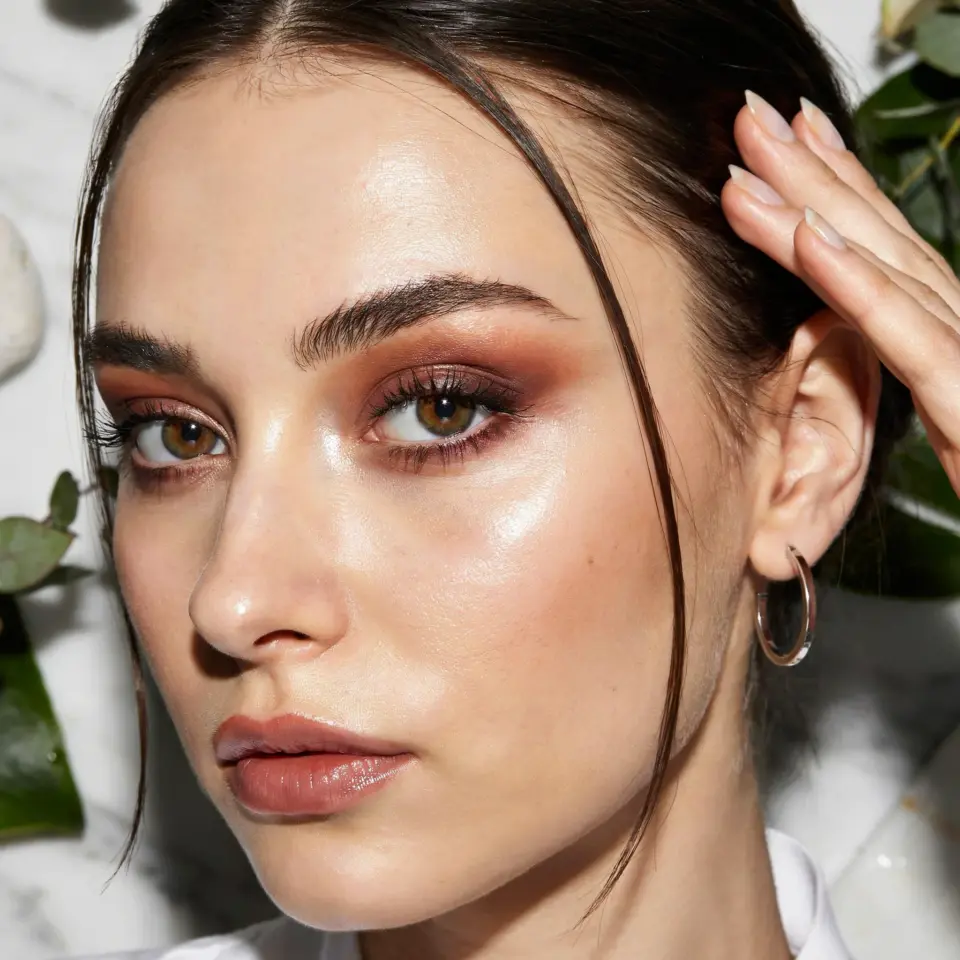
Planning your Virtual Posada Makeup for this year’s online Christmas celebration is exciting, but many people end up looking washed out, greasy, or downright messy on camera. After helping friends prep for their digital fiestas and making my own share of mistakes, I’ve learned exactly what goes wrong and how to fix it. This guide walks you through the most common pitfalls and gives you practical, camera-ready fixes so you can wear bold eye shadows, glitter accents, and rich lips without looking like a makeup accident. Let’s get your look right for that Zoom party.
Heavy Foundation That Appears Cakey on Screen
The biggest mistake I see is piling on thick foundation to hide imperfections. On a webcam, that heavy layer magnifies every crease and texture, making you look older and tired instead of festive. The camera actually softens many flaws, so you do not need full coverage.
Switch to a medium coverage liquid foundation or a tinted moisturizer with a satin finish. Apply a thin layer only where needed, then blend well with a damp sponge. Set it with a light dusting of translucent powder, focusing on the T zone. This keeps your base looking like skin while still giving you a polished surface for the bold colors to come.
Glitter That Falls All Over Your Face Before the Party
We all want that extra sparkle for BoldMakeupStyles, but loose glitter can migrate onto your cheeks and nose within minutes, ruining your whole look. I’ve watched friends spend ten minutes fixing fallout right before their Zoom call started, only to have it happen again.
Use a glitter glue or a tacky eye shadow primer specifically designed for shimmer. Pat the glitter on with a flat brush instead of sweeping it. For even more control, try pressed glitter shadows instead of loose glitters. They stick better and give you that bright pop without the mess. If you still get fallout, clean it up with a piece of tape before you set your face.
Lipstick That Bleeds or Disappears on Camera
Nothing kills a ChristmasPartyMakeup look faster than a bold lip that feathers into fine lines or fades to nothing halfway through the party. Many people skip liner or use a creamy bullet lipstick that slides off during the first cup of ponche.
Always line your lips with a pencil that matches your lipstick shade before applying any color. Fill in the whole lip with the liner as a base, then layer a long-wear liquid lipstick or a matte bullet on top. Blot once and add a tiny bit of translucent powder through a tissue to set it. This keeps your festive red or berry shade intact for hours, even while talking and laughing.
Eyebrows That Look Too Thin or Too Sharp
During a virtual posada, your brows are a focal point, but overplucking or filling them with a harsh, dark pencil makes you look surprised or angry. On the other hand, leaving them completely natural may make the rest of your bold eye makeup feel unbalanced.
Go for a soft, brushed up brow using a tinted gel. If you need more filling, use a fine tipped pencil in a shade lighter than your natural brow color and draw short, hair like strokes. Avoid any sharp lines or blocky shapes. A slightly thicker, fluffy brow balances the drama of glitter and dark lipstick beautifully.
Overdoing Highlighter for a Stealth Glow
Highlighter looks gorgeous in real life but can turn into a greasy, shiny mess under harsh Zoom lighting. Many people apply it on the apples of the cheeks and the tip of the nose, which catches every light source and creates an unflattering glare.
Stick to a subtle, finely milled powder highlighter on the tops of your cheekbones, the inner corners of your eyes, and just above your cupid’s bow. Avoid the center of your face completely. A more targeted placement gives you that illuminated glow without looking sweaty. For HolidayMakeupIdeas, a champagne or rose gold tone works better than a blinding white fenty style highlight.
Blush That Looks Like a Bruise on Screen
Dramatic ZoomMakeup calls for color, but applying blush too low or with too much pressure makes it look like a dark patch that ages your entire face. I see this especially with deep berry or plum shades meant for Christmas, used on camera they can look harsh.
Use a cream blush in a soft pink or warm coral instead of a dark powder. Apply it to the high points of your cheeks, blending upward toward your temples. The cream melts into your base and looks naturally flushed. Stick to one or two taps of product, then build if needed. A little goes a long way on video calls, and the color shows up more than you think.
Setting Spray Used at the Wrong Time
Many people assume a setting spray will fix everything, but using it after applying glitter or powder can actually move those particles around and create streaks. Worse, a dewy setting spray can make your base look greasy under your webcam.
Choose a mattifying or natural finish setting spray. Mist it after you finish your entire face but before you apply any final glitter accents. Let it dry completely, then add your glitter using a press on method or a spray designed for glitter. This locks your base without disturbing the sparkle. For a long Zoom party, carry a tiny blotting paper to touch up any shine that appears after an hour.
Ignoring Your Neck and Chest
When you are wearing a festive top for the holiday party, the camera often catches your neck and collarbone area. A common mistake is matching your foundation only to your face, leaving a visible line that looks unnatural and rushed.
Blend your foundation and a bit of bronzer down your jawline and onto your neck. If you are wearing a lower cut top, dust a little warm bronzer on your collarbones to match your face makeup. This small step makes your whole look cohesive and intentional, not like you stopped halfway through.
Not Testing Your Look Under Webcam Light
Here is the most practical tip I can give you: always check your makeup in the same lighting you will use for the actual call. What looks perfect in your bathroom mirror can look completely different on a laptop screen. Many people skip this and end up surprised.
Set up your webcam or phone camera at the same angle and distance you will use for the party. Turn on your room lights and any ring light you plan to use. Then look at yourself on screen. Adjust your shadow intensity, lip color, and highlighter placement based on what you see. Doing a five minute test before the party saves you from looking overdone or washed out.
The key to nailing your Virtual Posada Makeup is avoiding these simple but common errors. By using a lighter base, securing your glitter, prepping your lips, and testing your look in your actual call lighting, you will look bold, festive, and effortlessly polished on camera. Save this guide for your next digital fiesta and experiment with one fix at a time. Your Zoom party attendees will notice the difference, and you will feel confident shining all evening.
#VirtualPosadaMakeup #BoldMakeupStyles #HolidayMakeupIdeas #ChristmasPartyMakeup #ZoomMakeup
Leave a Comment